Alarm in Headphones
Keep your morning routine strictly private by routing high-fidelity alarm audio exclusively into your connected earbuds.
Overview
Waking up early shouldn't mean waking up the entire house. Alarm in Headphones is a sophisticated routing engine that intelligently directs your alarm audio (including Voice Announcements and Custom MP3s) straight into your connected earbuds or headset while completely bypassing the phone's primary external speaker.
This feature is universally compatible, explicitly supporting all audio hardware including standard wired headphones, Bluetooth A2DP headsets, Apple AirPods, Samsung Galaxy Buds, and generic true wireless earbuds.
Capabilities
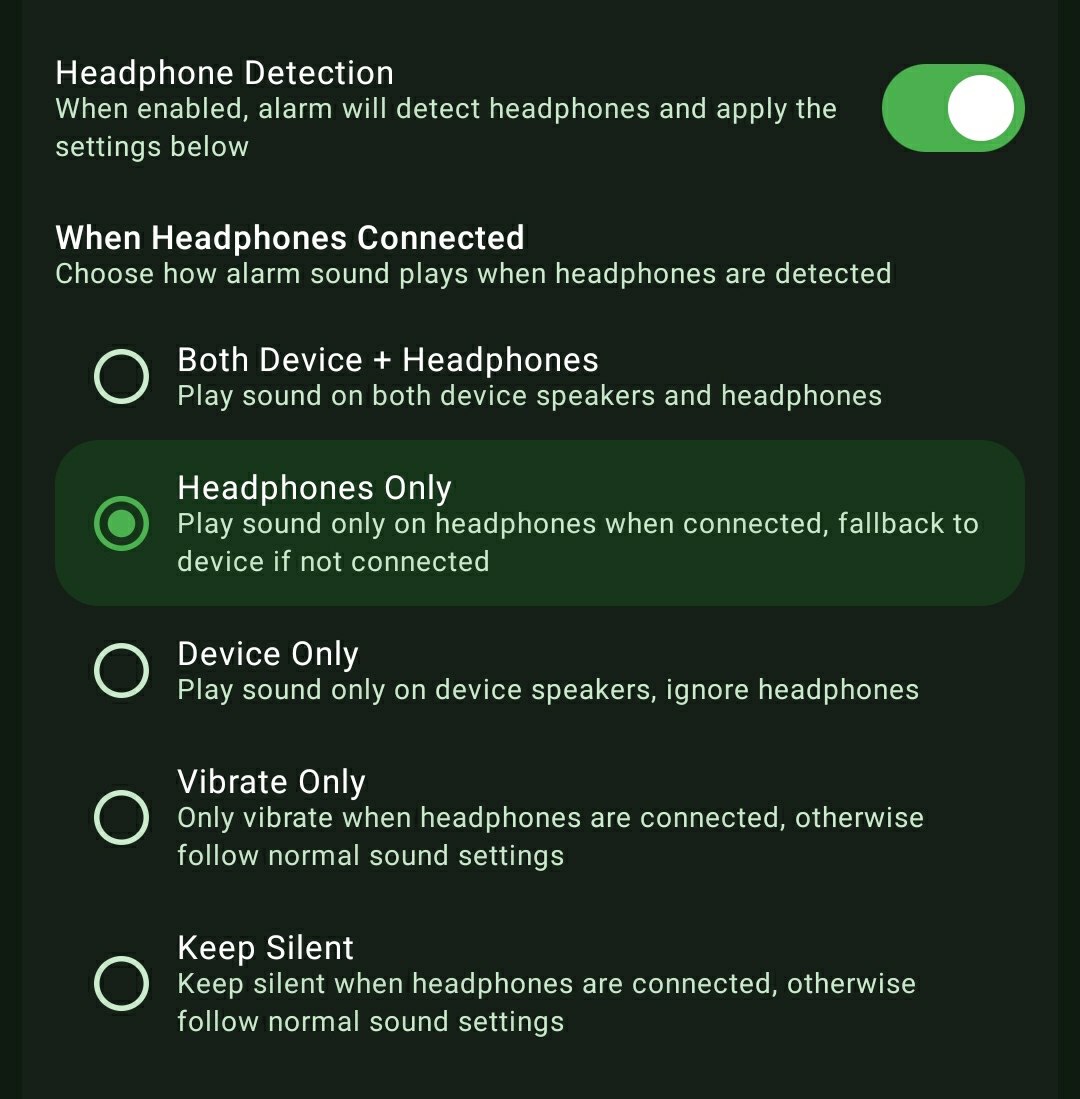
- Headphones Only: Force all alarm audio into the headset. If the headset dies or disconnects overnight, the system intelligently falls back to the loud device speakers so you never oversleep.
- Both Device + Headphones: Play the alarm through the headset and the phone's external speakers simultaneously for maximum auditory coverage.
- Device Only: Explicitly ignore connected headphones and force the alarm entirely through the phone's primary external speakers.
- Vibrate Only: Keep the room pitch black and entirely silent. The alarm will solely vibrate the phone when headphones are connected.
- Keep Silent: An advanced routing mechanism that keeps the alarm visually active on-screen but suppresses all audio completely when a headset is detected.
How to Setup
- Ensure your desired wired or Bluetooth headphones are actively connected to your Android device.
- While creating your alarm, toggle the master 'Headphone Detection' switch to ON.
- Under 'When Headphones Connected', select your precise routing preference (e.g., 'Headphones Only').
Use Cases
The Dorm Roommate: If you are a student athlete requiring a 5:00 AM wake-up call, route the alarm strictly into your AirPods to avoid waking your roommate sleeping three feet away.
Public Transit Commuter: Safely take a nap on a crowded train, bus, or airplane. ReAlarm will wake you up promptly without blasting an embarrassing siren through the entire cabin.
Office Meetings: Receive a discreet, perfectly timed alarm notification directly into your earbuds to signal the end of a long presentation or meeting without interrupting the speaker or alerting your colleagues.
Screenshots
Frequently Asked Questions
What happens if my wireless earbuds run out of battery while I am sleeping?
Does this feature interfere with my normal music or podcasts?
Do I need to leave the ReAlarm app open on my screen for Bluetooth routing to work?
Ready to Upgrade Your Morning?
Install ReAlarm today to unlock Alarm in Headphones for free.
Get it on Google Play