Math Stop Challenge
Force cognitive engagement by solving math problems to silence your alarm.
Overview
The Math Stop Challenge is a highly effective cognitive barrier designed specifically for heavy sleepers. By completely disabling the standard 'Dismiss' button, it forces your brain to wake up and process rapid numerical logic before the alarm will silence.
This guarantees that by the time the alarm finally turns off, your sleep inertia has been shattered and you are fully conscious, preventing the dreaded accidental snooze.
Capabilities
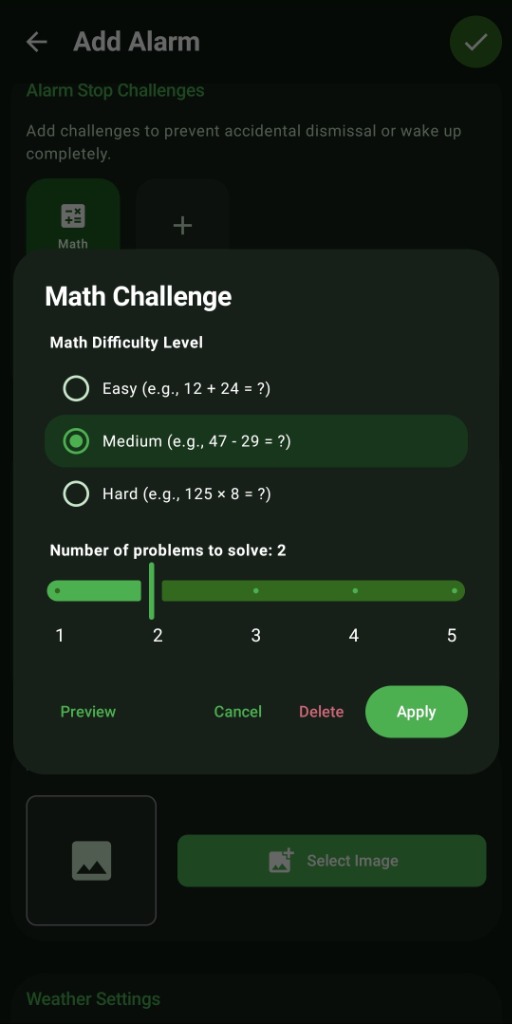
- Multiple Difficulty Tiers: Choose between Easy (e.g., 12 + 24), Medium (e.g., 47 - 29), and Hard (e.g., 125 x 8) depending on how aggressively you need to jumpstart your brain.
- Configurable Problem Count: Use a precise slider to demand anywhere from 1 to 5 consecutive math problems be solved correctly before the alarm yields.
- Dynamic Problem Generation: ReAlarm's engine programmatically generates entirely new, randomized math equations every single morning. You cannot memorize the answers.
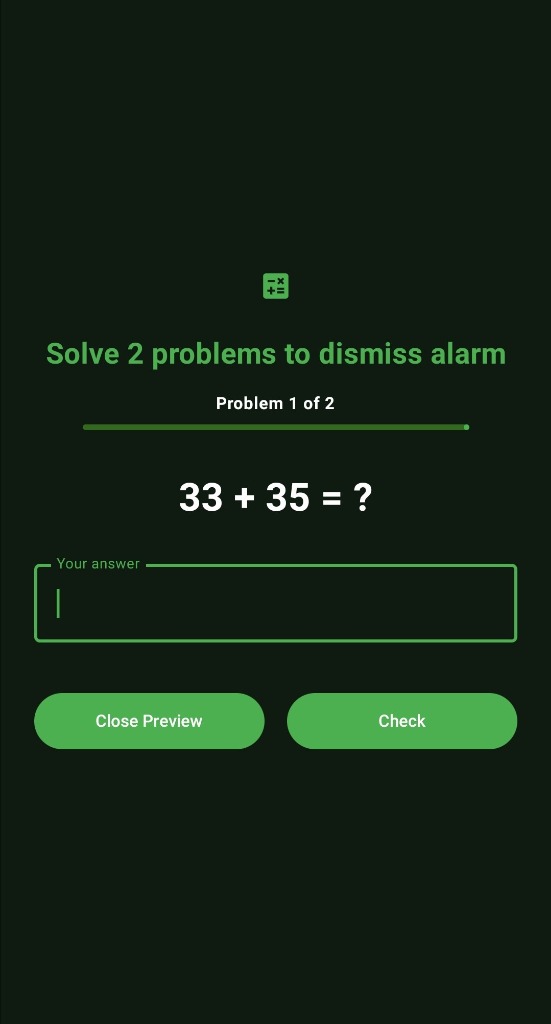
- Distraction-Free Interface: The challenge screen is completely locked down, featuring a clean, massive number pad and a minimalist green progress bar to track your success rate.
How to Setup
- Open any existing or new alarm and scroll down to the 'Alarm Stop Challenges' section.
- Tap the 'Math' icon to open the configuration modal.
- Select your preferred algorithmic 'Math Difficulty Level' radio button.
- Drag the 'Number of problems to solve' slider to your desired quantity (1-5).
- Hit the 'Preview' button to test the difficulty live, then tap 'Apply' to lock the challenge to the alarm.
Use Cases
Chronic Snoozers: Set the difficulty to 'Hard' with 3 problems. The sheer concentration required to multiply triple-digit numbers will wake anyone up.
Gentle Habit Builders: Set it to 'Easy' with 2 problems. Just enough basic addition to pull you out of a dream state without causing morning frusteration.
Screenshots
Frequently Asked Questions
What happens if I enter the wrong answer?
Can I bypass the math challenge by force-closing the app?
Is the math challenge available for free?
Ready to Upgrade Your Morning?
Install ReAlarm today to unlock Math Stop Challenge for free.
Get it on Google Play