Walk Stop Challenge
Walk up to 1000 steps to definitively silence your morning alarm.
Overview
Using the highly-accurate built-in pedometer capabilities of modern Android smartphones, the Walk Stop Challenge literally forces you to march out of your sleep cycle. By measuring your physical displacement, this challenge guarantees that by the time you've finished, you are far away from your bed and fully awake.
This is considered one of the most foolproof methods for defeating chronic oversleeping, as the sustained physical activity permanently clears morning brain fog.
Capabilities
- Native Sensor Integration: Accurately reads your device's internal step-counter sensors in real-time, preventing attempts to cheat by simply swinging your arm.
- Massive Step Limits: Highly configurable slider ranging from a brief 10-step morning stroll to a rigorous 1,000-step indoor workout before the alarm yields.
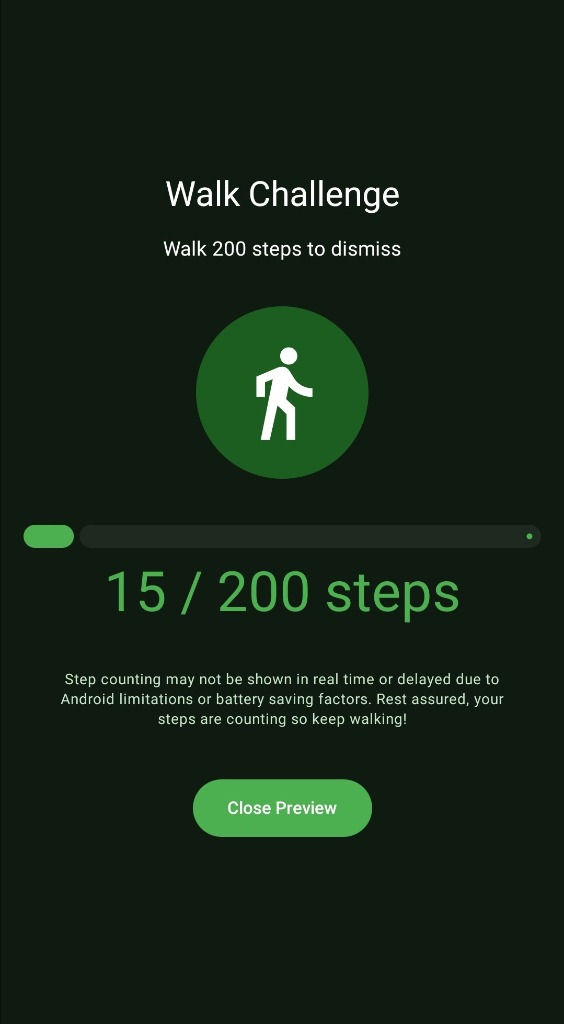
- Live Progress Tracking: Features a massive green completion ring and explicit fraction tracking (e.g., '15 / 200 steps') so you know exactly how far you've traveled while the alarm sounds.
- Battery & Hardware Aware: Automatically alerts users to potential Android battery-saving delays, actively monitoring step queues even if the real-time display momentarily pauses.
How to Setup
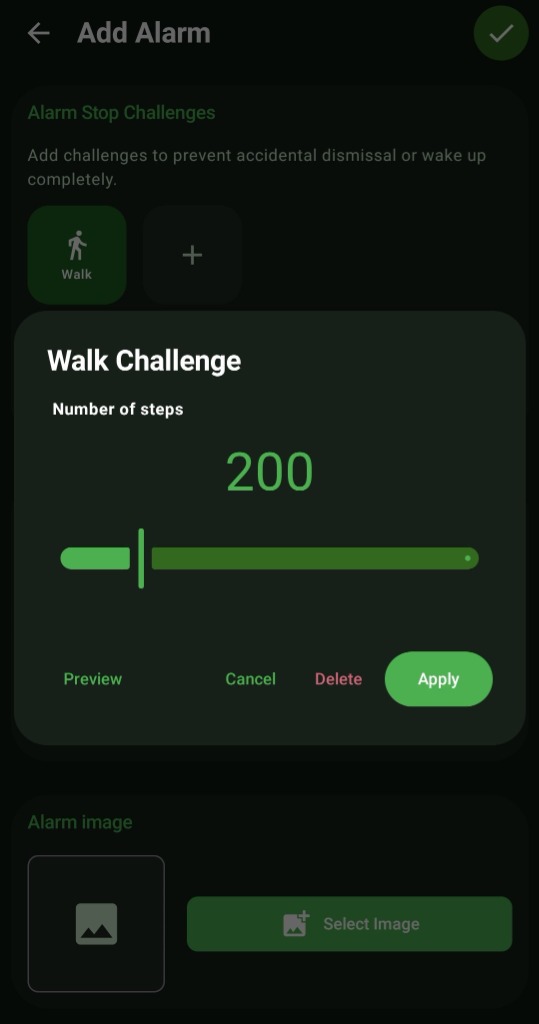
- In the 'New Alarm' configuration screen, navigate to 'Alarm Stop Challenges'.
- Tap the 'Walk' icon to open the pedometer setup modal.
- Drag the green slider (or tap the precise increment dots) to set your step target anywhere up to 1000 steps.
- Tap 'Apply' to save the physical challenge to your alarm schedule.
Use Cases
Bathroom Commutes: Set the exact number of steps it takes to walk from your bedroom to your bathroom sink (often around 30-50 steps). Once the alarm clears, you're already holding your toothbrush.
Morning Pacing Habits: For those trying to integrate morning exercise, setting a 500-step challenge forces a 5-minute pacing routine around the house before you are allowed to check your phone notifications.
Screenshots
Frequently Asked Questions
The steps aren't updating immediately when I walk, is it broken?
Can I just shake my phone instead of walking?
What happens if I put my phone down to catch my breath?
Ready to Upgrade Your Morning?
Install ReAlarm today to unlock Walk Stop Challenge for free.
Get it on Google Play