Ordinal Week-Day Alarms
Alarms based on patterns like 'The 2nd Wednesday' or 'Every Even Friday'.
Overview
Ordinal Alarms are designed specially for real-world events that operate on dynamic patterns rather than static calendar dates. Because the '1st Friday' of the month changes its numerical date every single month, standard alarms cannot handle this logic.
ReAlarm processes these complex ordinal rules locally on your device without needing network syncing, ensuring absolute reliability for street sweeping, corporate meetings, and patterned custody schedules.
Capabilities
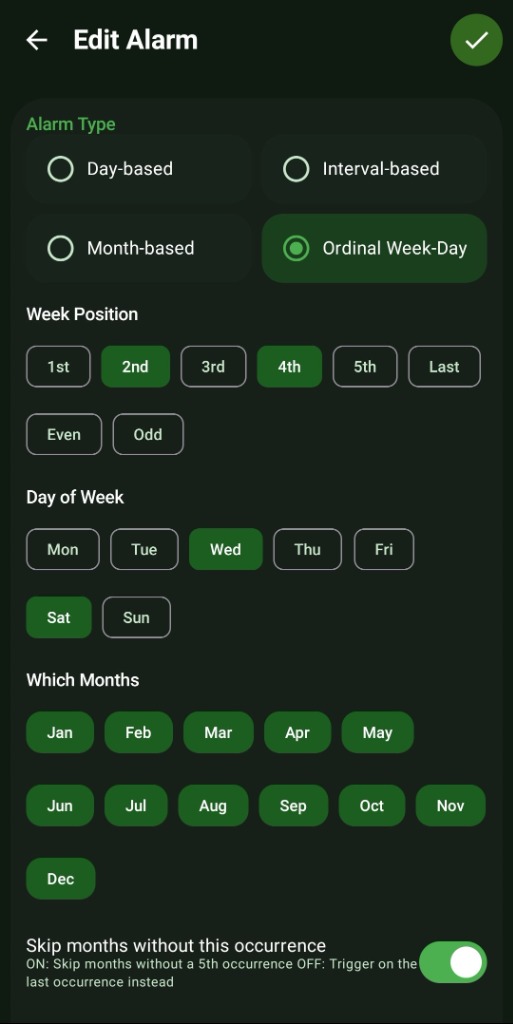
- Week Position Identifiers: Combine numerical ordinals (1st, 2nd, 3rd, 4th, 5th, Last) with any day of the week to create rules like 'The 3rd Thursday of the Month.'
- Even/Odd Execution: Unique logic that allows you to set alarms that trigger on 'Every Even Monday' or 'Every Odd Tuesday' of the month.
- Targeted Month Filtering: Just like Month-Based alarms, you can isolate these complex ordinal rules to only operate during specific months (e.g., '1st Sunday of June and July').
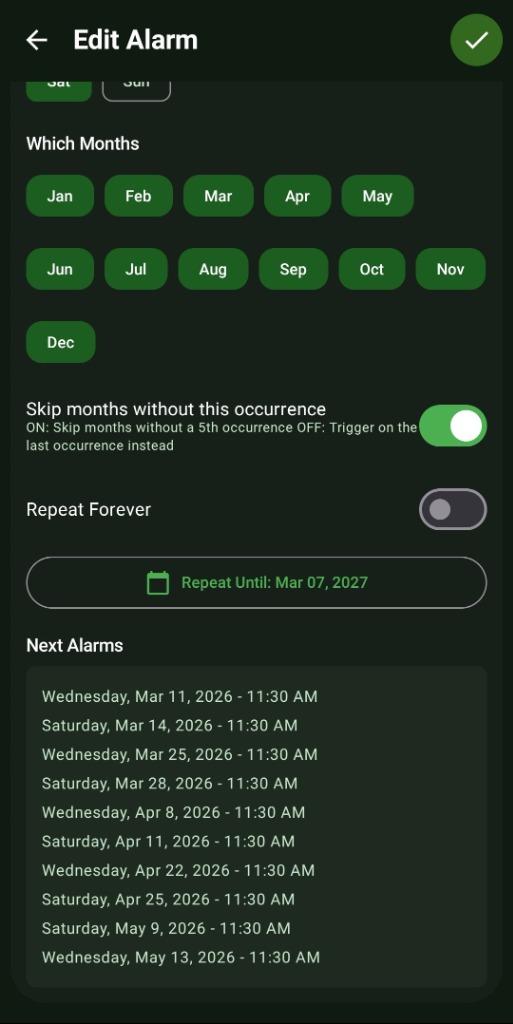
- Smart 5th Occurrence Skipping: Not every month has a 5th occurrence of a specific weekday. The 'Skip months without this occurrence' toggle dictates exactly how the alarm should behave when a 5th week is missing.
- Bounded Repeats (End Dates): Disable 'Repeat Forever' to seamlessly pause the patterned alert after a specific 'Repeat Until Date' passes.
How to Setup
- In the 'New Alarm' creation menu, select the 'Ordinal Week-Day' radio button.
- Under 'Week Position', select your modifier (e.g., '2nd', or 'Even').
- Under 'Day of Week', select the target day (e.g., 'Wed').
- (Optional) Filter which explicit 'Months' this rule applies to.
- Review the 'Next Alarms' list to verify that the generated calendar dates perfectly align with your intended pattern.
Use Cases
Street Sweeping/Parking: Never get a ticket again by setting an alert for '1st and 3rd Tuesday' to move your car.
Payday Reminders: Set an alarm for 'Every Even Friday' to remind yourself to transfer funds to savings.
Team Meetings: Create reminders for a mandatory 'First Wednesday of the Month' corporate sync that never falls on the wrong day.
Screenshots
Frequently Asked Questions
What happens if I select '5th' but the current month only has 4 weeks?
What is the difference between 'Last' and '4th' or '5th'?
Can I select multiple positions and days simultaneously?
Ready to Upgrade Your Morning?
Install ReAlarm today to unlock Ordinal Week-Day Alarms for free.
Get it on Google Play